
Zalo login on Android: moving to web authentication
A Vietnamese user reported a blocked Zalo login. This is how investigating the integration led us to keep Zalo and move authentication to the web.
October 5, 2026
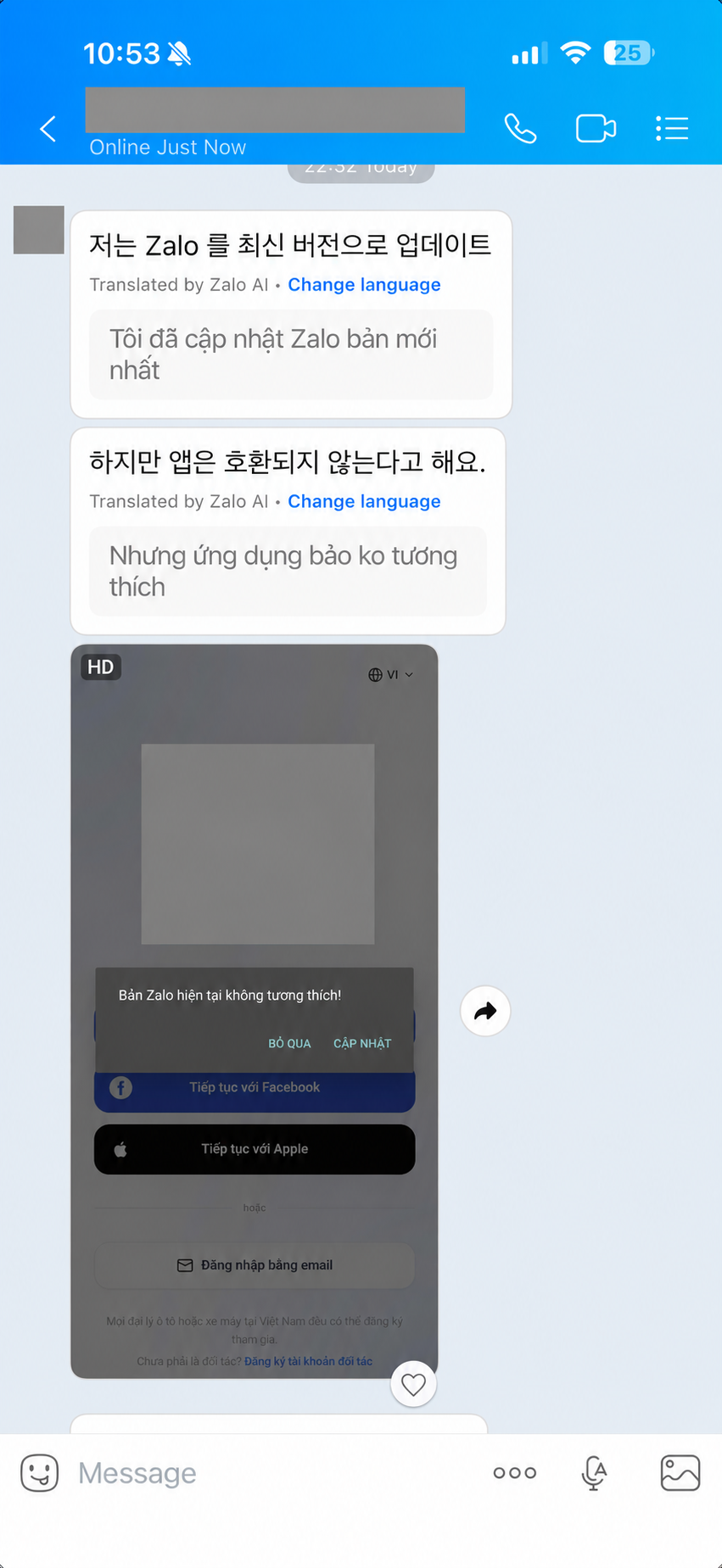
While operating the dealer partner app for an automotive platform in Vietnam, I heard directly from a Vietnamese user. They had updated Zalo to the latest version but still saw a compatibility warning. Their screenshot showed the error encountered when trying to sign in with Zalo on Android.
Bản Zalo hiện tại không tương thích!
The current Zalo version is not compatible.
Even users who had already updated received the same advice. They updated because the app asked them to, but it still said the version was incompatible. Tapping “Ignore” did not move the flow forward. There was nothing more the user could do on that screen.
Trying to fix one login
Initially, I expected to resolve it by checking integration settings or the SDK version. The more I researched, the less simple it looked. Documentation and other developers’ experiences raised similar difficulties around app-to-app compatibility and concerns about SDK maintenance. Web login appeared as a suggested workaround.
The frustrating part was that users could not log in while we investigated. First, we had to distinguish a problem we could fix in our code from one that needed a response from Zalo. The error message alone did not make that boundary clear.
The login flow launched the installed Zalo app and received its authentication result back in our app. It depended on our code, an external app, and the SDK working together. We did not establish precisely which internal Zalo change caused the error. While narrowing down the cause, we still needed a way for users to get in.
Removing Zalo was difficult too
Zalo was familiar to the Vietnamese users of our service. An integration being difficult to maintain did not erase the people who relied on its login button.
For dealers, login is the entrance to their work. If it is blocked, the rest of the product is inaccessible. We needed to keep Zalo while replacing the failing authentication path.
Move Zalo authentication to the web
We replaced the flow that launched the installed Zalo app with web login. Users could still sign in with a Zalo account, while we avoided the app-to-app path where the failure occurred.
Web login was not effortless either. The flow we checked required QR authentication or additional verification, which could be awkward when using a single phone. Moving to the web did not remove every constraint of Zalo authentication.
I could not say that every problem had disappeared. But we needed an alternative to the blocked route, and web authentication was the practical option available.
We also decided to make email login easier to find as an alternative. Users should not have to wait helplessly whenever Zalo fails. Returning to an existing account through another method matters too, so account linking needs consideration alongside the login buttons.
Login includes the screen after failure
This work was more draining than expected. Fixing one login meant examining external app and SDK compatibility, authentication restrictions, and user habits. Investigating the cause while restoring access was difficult.
I now want to check more than the success path when adding social login: where users return after a failure, what they can do next, and whether another method lets them access the same account.
We kept the Zalo option users needed. We also decided to prepare more routes into our service so that a blocked Zalo login would not block everything else.